Free classic ebooks: choose the edition before the file
Find free classic ebooks and check the language, translation and download format. Austen, Cervantes and an old title page show what to look for.
LexicAIze6 min

You can download free classic ebooks from the book pages at Standard Ebooks, where the original author, any translator and the available formats are listed together. Start with those details. A familiar title can lead to an English original, an English translation or an edition whose notes make it a very different reading experience.
Consider two files you might put on the same reader. Jane Austen's Pride and Prejudice is an English novel. Cervantes' Don Quixote, in the Standard Ebooks edition discussed below, is an English translation by John Ormsby. Both may suit an evening's reading. Only one gives you its author's original English prose, and neither gives you practice reading Spanish. Choosing the language is the first useful decision. Choosing the download comes after it.
Where to find free classic ebooks with clear credits
The Standard Ebooks page for Pride and Prejudice identifies Austen and provides a reading view alongside download options. That makes it a practical place to begin if you want the English novel on a phone, tablet or e-reader. Open the book page before selecting a file. You can check what the edition contains while the title and credits are still in front of you.
For a translated classic, the Don Quixote edition translated by John Ormsby makes the translator part of the book's identification. Its description also draws attention to Ormsby's footnotes. Those notes matter if you want help with historical references. They may matter less if you want to read a scene straight through and leave its background for later.
A good download page should let you answer a small question before you commit to a long book. Is this the language you want? Is the translator identified? Can you inspect a chapter? A button marked “free” answers none of those by itself.
Save the catalogue link with your file. Months later, the filename may be all that remains of your careful choice. A link gives you a route back to the credits, format instructions and source information.
A title page is part of the evidence
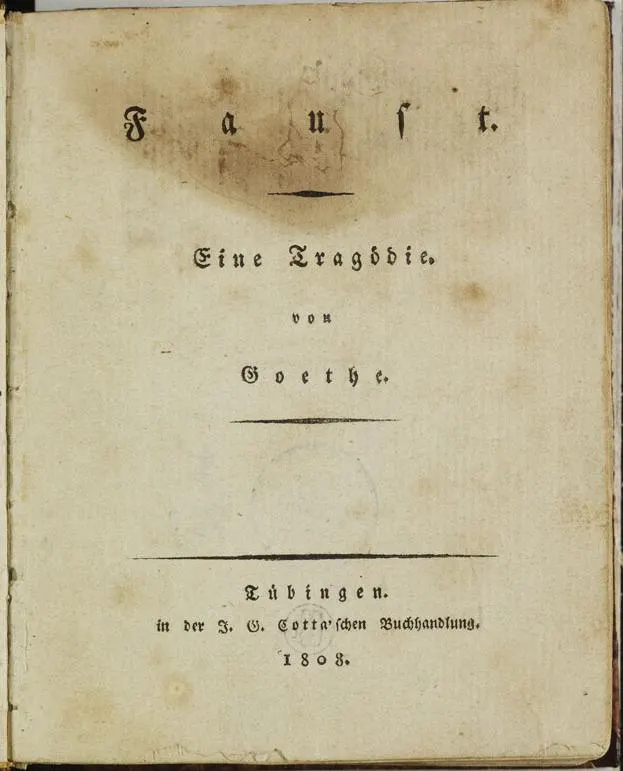
An old title page can settle a doubt that a modern cover leaves open. Look for an author, a translator where relevant, a volume number and the work's full title. Then compare those details with the digital edition's credits. The scan above records a printed edition of Faust. It tells you something about that physical book. You still need to check which text a particular EPUB supplies.
This becomes especially useful when a work has several parts. A download may contain the part you know from school, a longer collection or an edited selection. Open the contents and look for the section you actually mean to read. If your aim is a particular scene, find that scene in the reading view before transferring the file.
Language deserves the same check. An English catalogue description can accompany a book in another language. An English title may identify a translation. The opening paragraph is a better test than the language of the website around it.
For a language learner, this is a consequential distinction. If you want to read Don Quixote in Spanish, an excellent English translation still leaves you looking for the Spanish text. If you want to compare translation choices, the same English edition may be exactly what you need. The value of the file depends on the reading you intend to do with it.
Decide what you want from a translation
Ormsby's name on the Don Quixote page gives you a concrete edition to investigate. Read a paragraph of dialogue and one of narration. Look at how the notes are reached. You may enjoy the pace of a translation and find its notes distracting, or want precisely that extra historical help.
A translation also has its own diction. When an English expression seems old-fashioned, it may belong to the translator's period or approach. That is a reason to identify the translation before treating every unfamiliar phrase as a feature of the original author's language.
For comparison, keep the passage short. Choose a single exchange between characters and notice what each version does with forms of address, repetition or a joke. If you want original and translation together, check how bilingual books for adults arrange the two texts. Two complete files can be awkward to compare on a small screen, even when each is pleasant to read on its own.
Free access does not settle the rights of every edition everywhere. Standard Ebooks places a jurisdiction notice on its book pages, explaining that availability is based on the United States and asking readers elsewhere to check their local laws. Read the notice for the file you choose, especially before sharing a copy. A new translation or a newly added introduction has its own credits to examine.
Give the file a one-chapter trial
Choose the format recommended for your device on the download page. Where a compatible EPUB is offered, start there for an app that accepts EPUB. For a dedicated e-reader, follow the instructions attached to its particular download option. The catalogue's device labels are more useful than guessing from a filename.
Once the book opens, make the text larger. Check that the lines reflow and that the next paragraph remains easy to find. Then use the contents to jump to another chapter. For an edition with notes, follow one note and try returning to the sentence that sent you there.
These are small tests with large consequences over a long novel. A footnote you cannot return from is a nuisance on page three and a reason to abandon the file on page three hundred. Keep the edition that behaves comfortably on the device you actually use.
If you are reading in another language, try one page before deciding the whole book is beyond you. You might understand the conversation more readily than its descriptive opening. The article on reading books to learn a language looks at that choice in more detail.
A download folder can fill up faster than a reading habit develops. Keep the catalogue link, open the chapter you chose the book for, and see whether you want to turn the page.
If your chosen EPUB is in another language, you can open it in LexicAIze and read with a translation beside the original. Try a page and compare the passage that slows you down.
Keep reading
6 min
Pinocchio in Italian: who spoke in the workshop?
Read Pinocchio in Italian with Carlo Collodi's first chapter. Follow the voices in the workshop and see how repetition makes the original easier to read.

8 min
Kafka in German: reading the first sentence closely
Read Kafka in German through the opening of Die Verwandlung: follow the verb, question Ungeziefer, and see what an English translation has to choose.
8 min
Easy French books for beginners: three realistic first reads
Easy French books for beginners, with three original passages explained: Perrault, Maupassant and Verne, plus when to choose an adapted edition.